最終更新: a few seconds ago Remove Netlify-related code from main (grafted, HEAD)
CIRCUS CS プラグイン開発者ガイド
このドキュメントはドラフトです。
Overview
A plug-in for CIRCUS CS is a Docker image
with a manifest file called plugin.json.
Each plug-in reads anonymized DICOM image data stored in /circus/in and
writes processed data to /circus/out/results.json file.
To see how to actually build a Docker image, see the sample repository.
Plug-in definition file
The plug-in definition file is a JSON file named plugin.json.
It must be placed at the root (/) of the Docker image.
{
  "pluginName": "MRA-CAD",
  "version": "1.0.0",
  "description": "Detects aneurysms from MR angiography series.",
  "icon": {
    "glyph": "lung",
    "color": "#ff0000",
    "backgroundColor": "#000000"
  },
  "displayStrategy": [
    {
      "feedbackKey": "lesionCandidates",
      "caption": "Lesion Candidates",
      "type": "LesionCandidates",
      "options": { "maxDisplay": 3, "sortBy": ["rank", "asc"] }
    }
  ]
}
(🔶: Required)
- pluginName 🔶
- The name of the plug-in.
- version 🔶
- The incremental version of this plug-in. It must be compatible with semver. For example, "1.3.5" and "2.0.0-alpha" are valid version strings.
- description 🔶
- A small piece of text that describes what this plug-in does.
- icon
- The object that describes the icon of this plug-in.
It must have
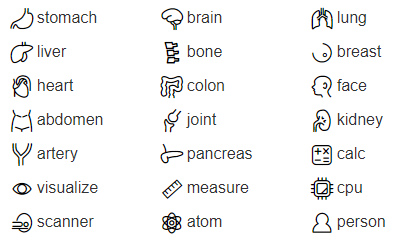
glyph,colorandbackgroundColorvalues (all of them are required).colorandbackGroundColormust be lowercase hexadecimal string like#0088aa. The value ofglyphcan be one of the following.
- displayStrategy
- Controls how the plug-in results will be presented to users and how feedback are collected. See below.
The displayStrategy format
(TBD)
Input Data
The input directry has a structure similar to this:
/circus
  /in
    /0.mhd
    /0.raw
    /0.txt
    /1.mhd
    /1.raw
    /1.txt
- *.raw
- The anonymized DICOM voxel values with no metadata or header.
- *.mhd
- A MHD-compatible header file that contains pixel format and dimension data. Many programs support the combination of *.raw and *.mhd files.
- *.txt
- An
ini-like file that contiains a selected set of DICOM tag values. A[common]section holds tag values that are shared across all the images in the corresponding DICOM series. Sections with numbers ([1],[2], ...) holds the other values. Currently, private tags are not exported.
Output
The output directory should have a structure similar to this:
/circus/
  out/
    results.json
results.json
results.json is the most important output of the CIRCUS CS plug-in.
It contains all of the calculated results except for large binary data.
resultsholds all of the main CAD results.attributesholds some metadata that help display the results properly.
See this JSON schema file for details. You can check the validity of results.json using any free or onlnine schema validator.
Example of results.json
{
  "results": {
    "lesionCandidates": [
      {
        "rank": 1,
        "confidence": 0.715,
        "volumeId": 0,
        "location": [125, 200, 48.5],
        "volumeSize": 74.863
      },
      {
        "rank": 2,
        "confidence": 0.603,
        "volumeId": 0,
        "location": [72, 383, 75],
        "volumeSize": 12.51
      }
    ]
  },
  "metadata": {
    "displayOptions": [
      {
        "volumeId": 0,
        "window": {
          "level": -600,
          "width": 1500
        },
        "crop": {
          "origin": [81, 108, 17],
          "size": [349, 260, 230]
        }
      }
    ]
  }
}